

Welcome to 3D Product Visualization, where shoppers don’t just see your product—they explore it. In a world of tiny screens and big expectations, 3D turns a flat listing into an experience: spin, zoom, inspect details, and understand scale before clicking “Buy.” Done right, it reduces uncertainty, boosts confidence, and makes your product feel more real than a photo ever could. This hub dives into the tools, workflows, and strategies behind high-converting 3D. You’ll find articles on creating clean 3D models, choosing the right formats, optimizing for fast load times, and using lighting and materials that feel truly lifelike. We’ll cover how 3D fits into product pages, ads, and marketplaces, plus how AR try-ons and room placement can shrink return rates by setting better expectations. Whether you’re launching a new product, expanding a catalog, or upgrading your brand presentation, these guides help you build visuals that sell—without slowing your site or blowing up production costs. Think of 3D as your always-on showroom: interactive, scalable, and built for modern buyers.
A: 360 is easier; true 3D is more interactive and reusable across content.
A: Not if you optimize files and use smart loading and fallbacks.
A: Items where scale, details, or fit drive purchase confidence.
A: Start with bestsellers or high-return items, then expand.
A: Often yes—better visualization reduces expectation gaps.
A: Heavy files and poor lighting that make products look fake.
A: Use material swaps and efficient texture sets for smooth switching.
A: For size-sensitive products, AR can be a strong confidence booster.
A: Yes—renders, spins, ads, and videos can all come from a single 3D file.
A: Engagement with the viewer, conversion lift, and changes in return rate.
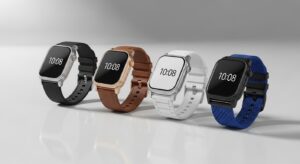
3D Product Mockups: The Future of Product Visualization
3D product mockups are redefining how brands visualize and market their products. From hyper-realistic rendering to interactive e-commerce experiences, discover how this technology speeds up design, reduces costs, and elevates storytelling. Learn why 3D visualization is becoming essential for modern businesses looking to stand out in a highly visual digital marketplace.